
Sim racing, once an esoteric niche within the gaming community, has rapidly accelerated to the mainstream, captivating audiences with its blend of realism and competitive spirit. As virtual tracks mirror their real-world counterparts and in-game car physics increasingly emulate reality, the lines between the virtual and real worlds of racing continue to blur. This surge in popularity has underscored the need for seamless integration between gaming software and hardware, particularly with racing wheels, which are essential for delivering a visceral, immersive driving experience.
In this intricate dance of compatibility, one brand stands out: Thrustmaster. A stalwart in the sim racing community, Thrustmaster has carved out an enviable reputation for its commitment to quality and precision. Recognizing the transformative role that a racing wheel plays in bridging the player with the digital car and track, Thrustmaster’s dedication to compatibility ensures that gamers aren’t just playing but are truly racing. This article delves into the diverse world of games that sync harmoniously with Thrustmaster wheels across various platforms, promising enthusiasts the pinnacle of sim racing experiences.
Understanding Compatibility
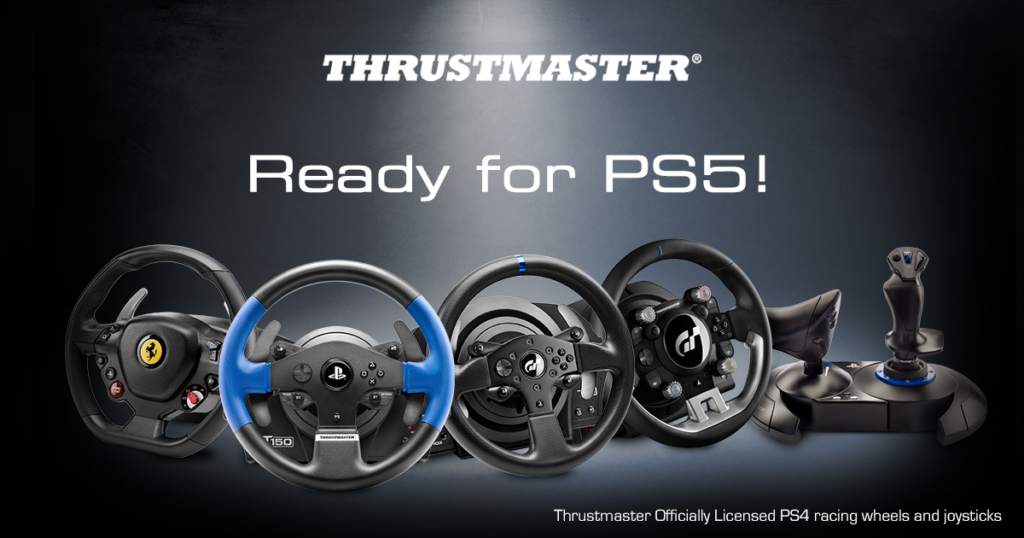
At the heart of every immersive sim racing experience is the symbiotic relationship between game software and hardware. Compatibility isn’t merely a checkbox feature; it’s the foundation upon which the entire racing simulation is built. Let’s unpack the factors that play into this intricate dynamic.
First and foremost, game software determines how wheel inputs are processed and translated into in-game actions. It’s the software that dictates how the feedback from the digital realm — the grittiness of the tarmac, the jolt from a sharp turn, or the tug of an accelerating car — is conveyed to the racer. Some games are optimized to support specific hardware features, ensuring a richer experience.
On the flip side, hardware specifications, such as the racing wheel’s sensitivity, force feedback mechanisms, and button layouts, determine how adeptly the device communicates with the game. It’s the conduit that brings digital thrills and spills to life in the player’s hands.
However, it’s essential to recognize that compatibility isn’t universal across all platforms. The architecture and software ecosystem of the PC differs markedly from consoles like the PS4 or the next-gen PS5. Each platform has its unique requirements and quirks, which can affect how well a game interacts with external hardware like a racing wheel. For instance, a game that offers a seamless plug-and-play experience on the PC might require additional calibration or settings adjustments on a PS4 or PS5.
In essence, understanding compatibility is the key to unlocking the most authentic and exhilarating sim racing adventures.
List for PC
The PC platform, with its expansive ecosystem and flexibility, offers a broad spectrum of sim racing titles. Here’s a curated list of 10 games that meld seamlessly with Thrustmaster wheels:
| Game Title | Year of Release | Special Features | Notes on Compatibility |
| Assetto Corsa | 2014 | FFB, VR | Full compatibility; ensure latest drivers. |
| Project CARS 2 | 2017 | FFB, VR, Weather System | Might require in-game calibration. |
| Dirt Rally 2.0 | 2019 | FFB, VR | Patch recommended for optimized FFB. |
| iRacing | 2008 | FFB, Multiplayer | Subscription-based; regular updates. |
| RaceRoom Racing Experience | 2013 | FFB, VR | Free base game; DLCs available. |
| rFactor 2 | 2013 | FFB, Weather System, VR | Optimal with third-party plugins for realism. |
| Automobilista 2 | 2020 | FFB, VR | Requires calibration for wheel range. |
| F1 2021 | 2021 | FFB, My Team Mode | Ensure game is updated for best compatibility. |
| BeamNG.drive | 2015 | FFB, Soft-body Physics | Wheel setup might need adjustments. |
| Live for Speed | 2003 | FFB, VR | Older title; verify drivers for optimal function. |
While many of these games offer a near plug-and-play experience with Thrustmaster wheels, it’s always a good practice to ensure both your game and wheel drivers are up-to-date. Some titles might also benefit from community-driven plugins or mods that further elevate the sim racing experience.
List for PS4
The PlayStation 4, as one of the dominant consoles of its generation, boasts a rich lineup of racing titles, many of which have been optimized for racing wheels like those from Thrustmaster. Here’s a selection of 10 noteworthy games for PS4 sim racing enthusiasts:
| Game Title | Year of Release | Special Features | Notes on Compatibility |
| Gran Turismo Sport | 2017 | FFB, VR, Photo Mode | Best with Thrustmaster T-GT for optimal feedback. |
| Driveclub | 2014 | FFB, Dynamic Weather | End of online support; full wheel compatibility. |
| F1 2019 | 2019 | FFB, Historical Content | Calibration recommended for first use. |
| WRC 9 | 2020 | FFB, Dynamic Weather | Optimal with latest game patches. |
| Project CARS | 2015 | FFB, VR | Some in-game settings adjustments may be needed. |
| The Crew 2 | 2018 | FFB, Open World | Adjust sensitivity for optimal experience. |
| Dirt 4 | 2017 | FFB, Rallycross Mode | Calibration often required. |
| NASCAR Heat 5 | 2020 | FFB, Career Mode | Wheel setup may need tweaks for realism. |
| MotoGP 20 | 2020 | FFB, Managerial Career | Ensure latest firmware for Thrustmaster. |
| Assetto Corsa Competizione | 2020 | FFB, GT World Challenge | Might require specific settings for FFB nuances. |
For PS4 users, it’s worth noting that some games, especially those not explicitly designed for racing wheel compatibility, might require you to toggle between different controller settings or use the wheel in conjunction with a standard PS4 controller. Furthermore, always keep both your game and Thrustmaster’s firmware up-to-date to ensure the most refined and immersive racing experiences.
List for PS5
The PlayStation 5, with its next-gen hardware and architectural advancements, promises not only visual grandeur but also refined integrations with peripherals. Thrustmaster, staying abreast of these changes, ensures sim racers continue to experience the thrill seamlessly. Here’s a snapshot of 10 PS5 titles that have captured the sim racing community‘s attention:
| Game Title | Year of Release | Special Features | Notes on Compatibility |
| Gran Turismo 7 | 2022 | FFB, VR, Ray Tracing | Optimized for Thrustmaster; Ultra-realistic feedback. |
| F1 2022 | 2022 | FFB, Story Mode | Enhanced FFB with PS5’s advanced haptic feedback. |
| Dirt 5 | 2020 | FFB, Dynamic Weather | Use with latest firmware for best compatibility. |
| Ride 4 | 2020 | FFB, Bike Customization | Adjust in-game settings for realistic feel. |
| WRC 10 | 2021 | FFB, Historical Rallies | PS5’s SSD ensures rapid load times with wheel. |
| Project CARS 3 | 2020 | FFB, Car Upgrades | Notable improvements in FFB over the PS4 version. |
| Hot Wheels Unleashed | 2021 | FFB, Track Editor | Casual racer but fun with a wheel; may need settings tweaks. |
| Automobilista 2 | 2021 | FFB, Dynamic Weather | PS5 version boasts quicker load times & better physics. |
| TT Isle of Man: Ride on the Edge 2 | 2020 | FFB, Open World | Enhanced visuals with PS5 make for a more immersive experience. |
| MotoGP 21 | 2021 | FFB, Managerial Career | Refined graphics & physics with the power of PS5. |
A notable advancement with the PS5 is its integration of advanced haptic feedback mechanisms, leveraging the console’s capabilities to render more nuanced force feedback sensations via compatible wheels. Additionally, the super-fast SSD of the PS5 ensures that games load swiftly, ensuring you spend more time on the track than on loading screens. As with any platform, always ensure that your Thrustmaster firmware and game software are regularly updated to tap into the fullest potential of the pairing.
Special Features & Considerations
When diving into the intricacies of sim racing, a few features stand out, magnifying the realism and immersion of the virtual cockpit. With Thrustmaster wheels, these nuances are even more pronounced. Let’s delve into them:
Force Feedback (FFB)
Force Feedback, commonly referred to as FFB, revolutionized sim racing. Instead of simply steering, players could now feel the road beneath the tires, the torque of the engine, the resistance of the wheel during sharp turns, and even the jolts from collisions. Thrustmaster wheels, known for their intricate FFB mechanisms, mirror these sensations with a fidelity that elevates gameplay.
However, the implementation of FFB can vary widely across games. Some titles, like Assetto Corsa or iRacing, are lauded for their nuanced and realistic force feedback, allowing players to truly sense the weight distribution of cars, slip angles, and even road textures. With a Thrustmaster wheel, these subtle feedback cues are presented in stunning clarity, giving racers an edge in predicting car behavior.
VR Compatibility
Virtual Reality (VR) and sim racing are a match made in heaven. The ability to virtually sit inside a cockpit, glance through side mirrors, or simply absorb the ambiance of a race track elevates immersion to unprecedented levels. Certain titles, like Project CARS 2 or Dirt Rally 2.0, when paired with VR, offer an experience so palpable, it’s easy to forget the virtuality of it all. Thrustmaster wheels enhance this realism, ensuring that the tactile feedback matches the 360-degree visuals, providing a holistic sensory experience.
Unique Integrations and Advantages
Some games boast integrations specifically tailored for Thrustmaster wheels. For instance, Gran Turismo Sport on PS4 and Gran Turismo 7 on PS5 have been closely developed with the Thrustmaster T-GT wheel, offering a mode called ‘T-DFB’ that enhances tire sensations, road textures, and suspension behaviors beyond standard FFB.
Furthermore, certain titles might come with exclusive modes or enhanced realism settings that are best experienced—or even exclusively available—with a Thrustmaster wheel. This synergy, crafted through partnerships between game developers and Thrustmaster, ensures that players get the most authentic and detailed racing experience possible.
In summary, the alliance of advanced hardware and software, underpinned by features like FFB and VR, and the unique integrations tailored for Thrustmaster wheels, promise sim racers a journey that’s as close to real racing as it gets from the comfort of their homes. Always be on the lookout for these features when choosing your next racing title, ensuring that every lap is more thrilling than the last.
Potential Issues and Solutions
No matter how refined a hardware-software combination might be, occasional hiccups are inevitable. When it comes to sim racing, even minor issues can disrupt the immersive experience. Let’s explore some common challenges faced by Thrustmaster wheel users and their potential remedies:
- Unresponsive or Inaccurate Force Feedback (FFB)
Issue: In some games, players might feel the FFB is either too weak, non-existent, or even exaggerated.
Solution: First, ensure the FFB settings in the game are correctly calibrated. Some games offer fine-tuning options for strength, dead zones, and saturation. Adjust these settings incrementally to find the sweet spot. If issues persist, check the Thrustmaster Control Panel (on PC) or console settings to ensure global FFB settings are appropriately configured.
- Wheel not Recognized by the Game
Issue: Occasionally, the game might not recognize the Thrustmaster wheel upon startup.
Solution: Ensure the wheel is correctly plugged in and powered. Restart the game and, if necessary, the entire system. Sometimes, switching the wheel to a different USB port can help. Additionally, ensure that the wheel’s firmware is updated, as outdated firmware might lead to compatibility issues.
- Stuttering or Lagging Inputs
Issue: There might be a delay between moving the wheel and the in-game response, or it may feel jittery.
Solution: This can often be attributed to background processes or driver conflicts on a PC. Close unnecessary applications running in the background, especially those that might interfere with USB devices. For console users, ensure the game and system software are up to date.
- Compatibility Patches & Software Solutions
While most modern games are designed to be plug-and-play with Thrustmaster wheels, some older titles or those not inherently optimized might require patches or third-party software for enhanced compatibility. For instance, Dirt Rally 2.0 had a patch specifically to improve FFB nuances. Ensure to regularly check the game’s official website or forums for any such updates.
Moreover, community platforms often develop tools or mods that can optimize the performance of wheels with specific games. An example is the third-party FFB plugins for rFactor 2 which can significantly improve the feel of the game with Thrustmaster wheels.
- Wheel Calibration Issues
Issue: The wheel might not center correctly, or its rotation might not align with the in-game wheel.
Solution: Most games and the Thrustmaster Control Panel offer wheel calibration options. Go through the calibration process, ensuring the wheel’s rotation matches the desired degree (e.g., 900°) and that it centers correctly.
In conclusion, while these are some common issues faced, the sim racing community is rich with enthusiasts who often share solutions and workarounds. Always remember to regularly check online forums, official game, and Thrustmaster websites for any updates or fixes. And, importantly, ensure your hardware firmware and game software are up to date for the smoothest racing experience.
User Experiences & Recommendations
The best insights often come from those at the heart of the action: the players themselves. Let’s explore what some users have said about their experiences using Thrustmaster wheels with various racing titles and distill their feedback into actionable recommendations.
Testimonials:
Alexa, sim racer since 2010: “I’ve raced with different wheels over the years, but my Thrustmaster T300RS truly shines with Gran Turismo 7 on PS5. The feedback is so detailed; I can almost feel the gravel on rally tracks!”
Javier, motorsport enthusiast: “Using the Thrustmaster wheel with F1 2022 is a game-changer. The precision and the FFB nuances – especially during rainy races – add a layer of realism I never knew I was missing.”
Samira, casual racer: “I didn’t think I’d need a racing wheel for Hot Wheels Unleashed given its arcade nature, but the Thrustmaster adds a fun twist to it. It’s a surprisingly immersive combo!”
Lee, a VR aficionado: “Racing in Project CARS 2 with my Thrustmaster wheel and VR headset is the closest I’ve felt to being on a real racetrack. Every bump, every skid, it’s visceral.”
Recommendations
- For Realism and Precision: If you’re looking for an authentic simulation experience where every detail matters, games like Gran Turismo 7, Assetto Corsa Competizione, and F1 2022 come highly recommended by many Thrustmaster users.
- For VR Enthusiasts: Titles like Project CARS 2 and Dirt Rally 2.0 have repeatedly been highlighted for their exceptional VR integration. Paired with a Thrustmaster wheel, the immersion is unparalleled.
- Casual Racers: While sim racing can be complex, it doesn’t mean casual racers can’t have fun. Titles like Hot Wheels Unleashed or The Crew 2 offer a laid-back experience, but when paired with a Thrustmaster wheel, they can become surprisingly engaging.
- Community Mods & Plugins: Users often highlight the benefits of third-party modifications, especially for PC racers. Keep an ear to the ground on sim racing forums and communities. They often develop and share tweaks that can enhance the Thrustmaster experience with specific titles.
Remember, the best racing experience is a personal journey. While user testimonials can guide your choices, diving in and experimenting with different games will help you find the perfect race for your pulse.
Future Outlook & Updates
As the sim racing landscape continuously evolves, the nexus between gaming software and hardware becomes ever more sophisticated. Given Thrustmaster’s legacy in the field, it’s always exciting to peer into the horizon and predict what’s next for the enthusiasts. Here’s a glimpse into the future:
- Upcoming Compatible Games : Several highly-anticipated racing titles are slated for release in the near future. While detailed compatibility checks are still underway, there are strong indications, based on developer insights and past trends, that these games will be harmonized for Thrustmaster wheels:
- SuperSpeed Rally X: Teasers hint at a novel take on rally racing with an emphasis on realistic terrains and weather dynamics.
- Project Street Racer: Touted as the next big thing in street racing simulations, early beta testers have cited exquisite details in car physics.
- Endurance Legends: Focusing on endurance races like Le Mans, this title promises long, engaging races with day-night cycles and dynamic weather.
Keep a close eye on official game announcements and Thrustmaster’s communication channels for detailed compatibility insights as these titles near their release.
Thrustmaster’s Innovations

- Advanced Haptic Integration: Given the industry’s pivot towards more nuanced force feedback, especially with platforms like the PS5 emphasizing advanced haptic feedback, Thrustmaster is rumored to be working on an even more refined FFB mechanism to synchronize with these advancements.
- VR Synergy: As VR continues its upward trajectory, Thrustmaster is believed to be exploring collaborations with major VR headset brands to ensure an even tighter integration, providing users with a unified setup process and enhanced in-game sensations.
- Driver & Firmware Updates: Keeping with the tradition, Thrustmaster is expected to frequently roll out updates to its drivers and firmware, ensuring optimal compatibility with new titles and addressing any known issues with existing games.
The future indeed seems luminous for sim racers. With an array of exciting titles in the pipeline and Thrustmaster’s unwavering commitment to innovation, the boundaries of realism in virtual racing are set to expand even further. Stay abreast of official announcements, join community forums, and be ready to rev up for the next chapter in sim racing!
Conclusion
The world of sim racing is a convergence of software artistry and hardware prowess, and at this intersection lies the exhilarating realism that enthusiasts seek. Ensuring seamless compatibility between your wheel and game isn’t just a technical requirement; it’s the key to unlocking the ultimate racing experience. It’s the difference between merely playing a game and feeling every turn, every skid, every victory.
We encourage all our readers to be vocal about their experiences. Your insights, your challenges, and your solutions help the community grow and evolve. The sim racing journey is unique for everyone, and sharing these tales of virtual rubber meeting the road helps newcomers navigate and veterans refine their setups.
Frequently Updated
The world of tech and gaming is dynamic. New titles emerge, updates roll out, and compatibility matrices evolve. To ensure you’re always at the pinnacle of your sim racing game, it’s crucial to stay informed. Bookmark this page, and rest assured, we’ll keep our finger on the pulse, updating this resource with the latest in compatibility and recommendations.
Engage with Readers
Sim racing isn’t just a hobby; it’s a community. We’ve dedicated a section below for you to interact, discuss, and share. Got a question about a specific setup? Fire away. Found a hidden gem of a game that pairs beautifully with your Thrustmaster? Let everyone know. Noticed a tweak or a mod that enhances the experience? Share the knowledge.


